Storm Guard - Weather Radar
KernaliteWeather
4.191.00 Reviews
- Version
- 1.60
- Installs
- 10.00K
- Age Rating
- Everyone
Screenshots
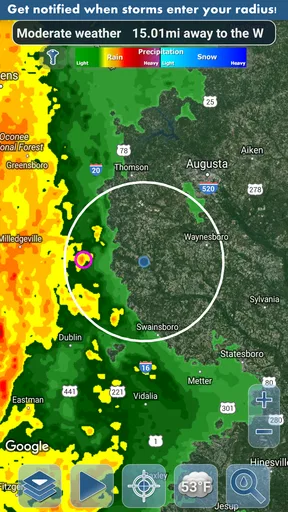
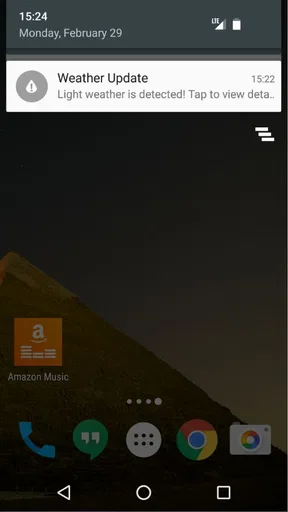
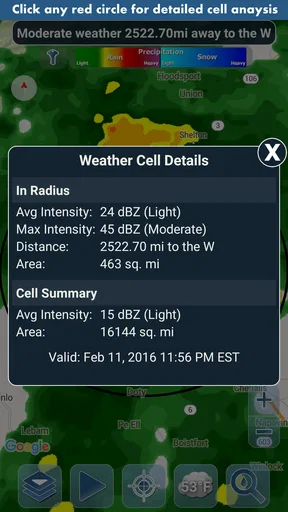
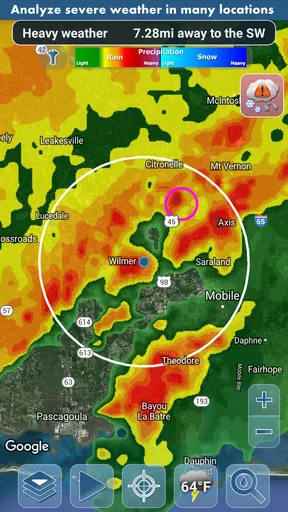
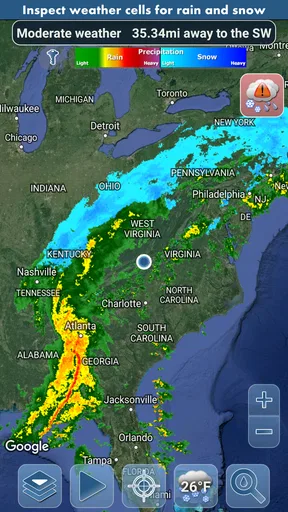
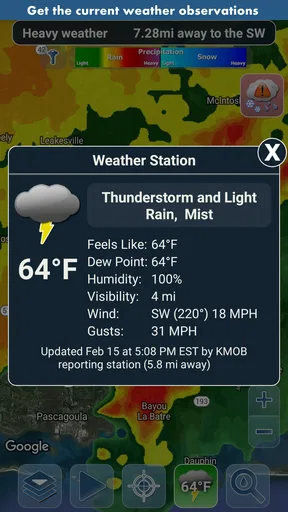
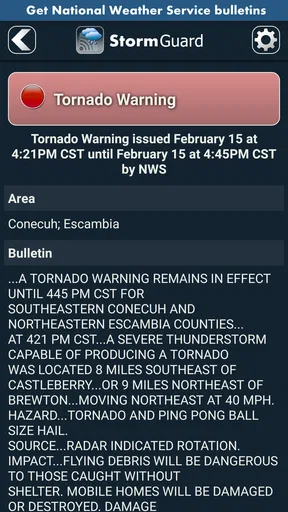
Our Review of Storm Guard - Weather Radar
 Analysis by Appyee
I like weather apps that help me make a decision rather than simply decorate the screen with forecasts. Storm Guard - Weather Radar takes that practical route. It is a free weather app from Kernalite built around rain and snow detection notifications, with storm analysis intended to help me react before bad weather becomes obvious outside. After spending time with it, I see it as a focused companion for people who care about changing conditions, not as a complete replacement for every general-purpose weather service.
The app belongs to the weather category, carries an Everyone age rating, and has reached over ten thousand installs. Its average rating is 4.1 from more than a hundred ratings, which suggests a reasonably positive reception without making the app look universally loved. That feels consistent with my impression: the central idea is useful, but the value depends heavily on whether you want alerts about precipitation and storms rather than a broad collection of lifestyle weather tools.
How Storm Guard feels in everyday use
I use Storm Guard as a prompt to pause and reassess, not as an automatic instruction to cancel plans. That distinction makes its alerts easier to act on: I can check the sky, consider where I’m headed, and decide whether a quick change—like taking a jacket or bringing outdoor items inside—is enough.
Quick alerts are the main reason to keep it installed
The most convincing part of Storm Guard - Weather Radar is its emphasis on near-term awareness. A normal forecast can tell me that rain is possible later, but a detection-focused app addresses a more immediate question: is weather moving toward me now? That difference matters when I am deciding whether to leave a window open, walk instead of drive, take laundry indoors, or wait before starting an outdoor task.
I would not treat every notification as a command to change my entire day. Weather changes quickly, and a rain or snow signal is most useful when I combine it with what I can see outside and the timing of my plans. The app works best as an early nudge. It gives me a reason to check conditions before committing to something that would be inconvenient in heavy precipitation.
A realistic example is a short trip across town. I might check a standard forecast in the morning and see no obvious reason to carry an umbrella. Later, before leaving work, a Storm Guard alert could prompt me to look again. Even if the shower turns out to be brief, that warning has practical value because it arrives at the moment a broad daily forecast is least helpful.
Speed expectations should stay realistic
The app’s purpose creates an expectation of speed, but “real-time” should not be interpreted as a guarantee that every alert will arrive at the exact first drop of rain. Detection, processing, network conditions, device behavior, and local weather patterns can all affect timing. I find the concept useful precisely when I treat it as short-range guidance rather than a perfect countdown.
Storm analysis also needs to be read as context, not certainty. A storm can weaken, split, change direction, or miss a neighborhood while still producing a meaningful signal nearby. For that reason, I would use the app to decide when to reassess a plan, not to promise that a specific street will receive rain at a precise minute.
Compared with a conventional forecast app, the advantage is focus. A typical weather app may give me temperature, hourly conditions, wind, and a multi-day outlook, but those details can bury the immediate question of whether precipitation is approaching. Storm Guard feels more purposeful for that narrow decision. The trade-off is that I may still want another weather source when planning travel, checking temperatures, or comparing conditions several days ahead.
What happens during heavy-use moments
The most demanding situation for this kind of app is not casual browsing. It is a period when weather is changing quickly and many people are checking conditions at once, while their phones may also be handling navigation, calls, streaming, or other background activity. I judge Storm Guard mainly by whether its focused alert role remains understandable in those moments.
For my own workflow, I would avoid repeatedly opening the app every few minutes. That defeats the point of notifications and can make any weather tool feel slower simply because I am forcing it to refresh constantly. A better approach is to let the app serve as a background watcher, then open it when an alert gives me a reason to investigate.
This also makes the app easier on the phone than a weather dashboard that I leave open all day. I cannot claim a specific battery or memory figure, and the available product details do not establish one. Still, the sensible habit is clear: use notifications for awareness and open the app for decisions. Continuous manual checking is unnecessary unless I am actively monitoring a storm.
People who work outdoors may get more value from that pattern than people who only want a morning forecast. A gardener, cyclist, delivery worker, parent supervising outdoor activities, or anyone responsible for equipment outside can use an alert as a checkpoint in the day. The app is less compelling for someone who wants detailed climate history, pollen information, or a rich travel-planning dashboard.
Stability matters more than visual extras
Storm Guard’s narrow purpose is a strength when I want a direct answer, but it also means I notice reliability issues more sharply. If an alert is late, unclear, or difficult to interpret, there are not many unrelated features to compensate for that weakness. A focused tool has to earn its place by being dependable in its main job.
I would build a simple backup habit around it. For important plans, I would check the alert, look at the sky, and confirm the broader forecast before making a high-consequence decision. That is not a criticism unique to this app; short-range weather detection is inherently local and changeable. It is simply the responsible way to use notifications that describe evolving conditions.
Recovery is another practical consideration. If I dismiss an alert while busy, I would want to return to the app and reassess rather than assume the notification was the only chance to understand the situation. The app is most useful when it becomes part of a repeatable routine: notice the alert, inspect the current situation, adjust the plan, and check again if the activity matters.
That routine also helps separate a genuinely useful warning from notification fatigue. If I enable every possible alert without thinking about my schedule, frequent weather messages may become easy to ignore. I prefer using the app around periods when outdoor conditions matter, then reducing interruptions when they do not. A weather alert is valuable only if I still pay attention to it.
Device constraints and compatibility
The listed minimum operating-system requirement is version 10, so anyone using an older device should check compatibility before planning around the app. On supported hardware, the main practical constraints are less about advanced graphics and more about whether the phone can deliver notifications consistently while the app is not in the foreground.
That means ordinary phone habits matter. Aggressive background restrictions, muted notifications, or a device that is frequently offline can reduce the usefulness of any alert-based weather service. I would review the phone’s notification settings and make sure Storm Guard is allowed to communicate when it is not open. I would also avoid assuming that an alert can replace local awareness during dangerous weather.
The current version is 1.60, and the app was released on February 28, 2016. Those details place it in a mature product timeline rather than making it a brand-new experiment. A long-running app can be reassuring for someone who prefers an established tool, although age also makes me more cautious about expecting the newest interface conventions or the broadest set of modern weather integrations.
The free price makes trying it straightforward. There are in-app purchases priced at $0.99 per item, so I would inspect what any optional purchase changes before paying. The low entry barrier is helpful because the app’s usefulness is personal: it depends on local weather, notification habits, and whether storm alerts fit my routine. I can test that relationship without committing to a subscription.
Where it beats ordinary forecast apps
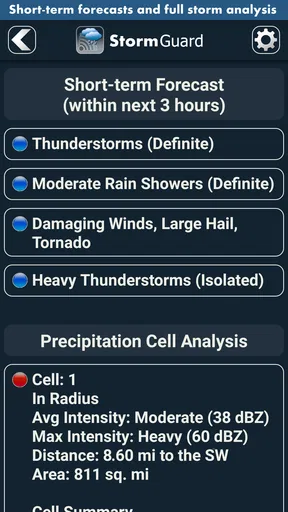
Storm Guard has a clear edge when the question is immediate precipitation awareness. If I am leaving for a walk, deciding whether to start a job outside, or watching a storm approach, an alert-centered design can be more useful than scrolling through a long forecast page. The app’s storm analysis gives the experience a more situational feel than a simple temperature display.
It can also reduce the need to keep checking a radar view manually. Radar maps are powerful, but they require interpretation and attention. A notification gives me a simpler prompt: conditions deserve another look. For users who find radar maps confusing or who do not want to monitor them continuously, that is a meaningful advantage.
However, the usual alternatives remain better for several jobs. A full weather service is preferable when I need a detailed hourly schedule, extended planning, multiple environmental measurements, or a broad overview of several locations. A dedicated emergency-alert source is more appropriate when safety decisions depend on official warnings. Storm Guard can support those tools, but I would not make it my only source during severe weather.
Another trade-off is information density. Some users want a clean, focused warning; others want charts, maps, historical context, and extensive customization. The former group is more likely to appreciate this app. The latter may find it too narrow, even if the rain and snow detection concept is sound.
Three useful ways to get more from it
- Use alerts as decision points: Instead of checking the app compulsively, let a notification tell you when to reassess an outdoor plan. This keeps the tool useful without turning it into a constant distraction.
- Pair detection with observation: When an alert arrives, compare it with the visible sky and your intended route. A nearby shower may affect one part of a journey while leaving another part dry.
- Keep a second source for major plans: Use Storm Guard for immediate rain or snow awareness, then consult a broader forecast or official warning channel when travel, work, or safety depends on more complete information.
A fourth habit is especially useful for people who share responsibility for a home or workplace: respond to the alert with a short checklist. Bring in loose items, protect equipment, close exposed windows, or delay a task that is difficult to stop halfway through. The notification becomes more valuable when it is connected to a prepared action instead of being treated as interesting information.
Who should install it, and who should skip it
I would recommend Storm Guard to someone who frequently makes short-term outdoor decisions and wants precipitation warnings without turning weather checking into a research project. It is a sensible fit for walkers, cyclists, gardeners, outdoor workers, parents, and anyone who wants a prompt before rain or snow disrupts a plan.
I would be less enthusiastic for a user who wants one app to cover every weather need. If your priority is long-range trip planning, detailed maps, multiple forecast models, air-quality information, or a large collection of measurements, a more comprehensive weather platform will probably suit you better. The focused approach that makes Storm Guard convenient can also make it feel limited.
I would also skip relying on it alone for hazardous conditions. Storm analysis and precipitation detection are useful for everyday planning, but serious weather requires attention to official alerts and local guidance. The app can be one layer in a sensible setup, not the entire safety plan.
My performance verdict
After weighing its purpose against its limits, I see Storm Guard as a practical specialist rather than a universal weather replacement. Its strongest quality is the way it turns changing rain and snow conditions into a timely reason to act. That is more useful to me than another generic forecast screen when I am already deciding whether to go outside.
Its perceived speed is best understood as alert-oriented rather than guaranteed instant detection. Its resource demands are difficult to judge through a single published figure, but the focused workflow encourages occasional checking instead of leaving a data-heavy dashboard open. Reliability depends not only on the app but also on notification settings, connectivity, local weather behavior, and my willingness to confirm important information elsewhere.
Kernalite has made a free weather app with a clear identity, and that clarity is its main appeal. The Everyone rating makes it approachable for general household use, while the optional $0.99 purchases leave room for users who want to explore extras without paying upfront. I would install it if immediate rain and snow awareness is the missing piece in my routine.
My recommendation is simple: choose Storm Guard when timely precipitation prompts matter more than a complete weather dashboard. It earns a place beside, rather than necessarily instead of, a broader forecast app. Used that way, it can help me make small decisions earlier, avoid unnecessary interruptions, and recover more gracefully when the weather changes faster than the morning forecast suggested.
Verdict
Strengths of Storm Guard - Weather Radar
- Clear radar maps make approaching rain and storms easy to track.
- Severe weather alerts help users prepare before conditions worsen.
- Supports location-based forecasts for current and nearby areas.
- Useful precipitation layers provide more detail than basic weather apps.
- Clean interface allows quick access to essential weather information.
Limitations of Storm Guard - Weather Radar
- Some advanced radar features may require a paid subscription.
- Forecast accuracy can vary significantly by region and local data coverage.
- Frequent alerts may become distracting during active storm periods.
- Radar imagery can consume noticeable mobile data when used often.
- The app may feel less useful in areas with limited weather station coverage.
Other Releases by Kernalite
View All
Marine Ways
Travel & Local4.6
Similar Picks in This Category
View All
Weather - By Xiaomi
Xiaomi Inc.4.1

Weather & Radar Forecast
WetterOnline4.8

Weather
OneLouder Apps4.6

AccuWeather: Weather Radar
AccuWeather3.6

The Weather Channel - Radar
The Weather Channel4.6

1Weather Forecasts & Radar
OneLouder Apps4.3
Frequently Asked Questions
What is Storm Guard - Weather Radar used for?
Storm Guard - Weather Radar is designed to help you monitor current and developing weather conditions through radar maps, storm tracking, forecasts, and weather alerts. It can be useful for checking rain, thunderstorms, severe weather, and approaching systems before commuting, traveling, working outdoors, or planning activities. The exact features and alert coverage may vary depending on your location and the data available in your region.
Does Storm Guard - Weather Radar provide accurate and real-time weather information?
The app uses weather and radar data to present frequently updated conditions, but it should not be treated as an infallible source. Radar images and forecasts can change as new information becomes available, and accuracy may differ between locations, especially in rural areas or regions with limited monitoring coverage. For serious storms, users should also follow official emergency notifications and local weather authorities.
Can I receive severe weather alerts with Storm Guard - Weather Radar?
Storm Guard - Weather Radar may provide notifications for storms, heavy rain, severe weather, or other important conditions, depending on the app version, your location, and the alert features included in your subscription or settings. You normally need to allow notifications and location access for the system to work properly. Before relying on alerts, review the notification settings and confirm that coverage is available in your area.
Does the app require location access or an internet connection?
Location access is generally helpful because it allows Storm Guard - Weather Radar to display weather information and alerts for your current area. An internet or mobile data connection is also normally required to download updated radar imagery, forecasts, and warnings. If you deny location permission, you may still be able to search for places manually, but some personalized features and automatic alerts may be limited.
Is Storm Guard - Weather Radar free to download, and are there in-app purchases?
The app may be available as a free download, but some features can depend on advertising, premium access, or in-app purchases. Advanced radar layers, extended forecasts, ad-free viewing, additional alerts, or other tools may not be included in the basic version. Before downloading or subscribing, check the current Google Play or App Store listing for pricing, trial terms, renewal conditions, and supported devices.
